Field notes / MadHacks 2026 / Madison, WI

Dig

It checks if your home internet is lying to you, and proves it.

Dig is an Android app. It digs down through your Wi-Fi, your router, DNS and the internet, and tells you in plain words where something is wrong. Nothing leaves your phone unless you send it.

Get the app How it proves a lie

A block of ground cut open under a house. Four layers from top to bottom: Wi-Fi, Router, DNS and Internet. A drill runs down from the house through Wi-Fi and Router and stops in the DNS layer, which is cracked and glowing orange.the drill stops hereLAYER 1Wi-FicleanLAYER 2RoutercleanLAYER 3DNSfake answersLAYER 4Internetnot reached
Fig. 1. A home connection, cut top to bottom. This one has a router that hands out fake answers.

Sample 01 / The problem / April 7, 2026

In April, the FBI had to reset hijacked routers in the US.

On April 7, 2026, the Justice Department and the FBI ran a court-authorized operation. It reset the DNS settings on hijacked TP-Link routers in the US so they would again obtain legitimate DNS resolvers from their ISPs.1

The Justice Department says Russian military intelligence, GRU Unit 26165, had been stealing the logins for thousands of TP-Link routers worldwide since at least 2024.1 The head of the FBI's Boston office said the GRU weaponized routers in more than 23 states.1

DNS is the phone book of the internet. Your phone asks it where a website lives. A hijacked router points every device in the house at a phone book the attacker wrote. The UK's National Cyber Security Centre says the changed settings were subsequently inherited by downstream devices, for example laptops and phones.3

Microsoft counted over 200 organizations and 5,000 consumer devices hit by the attackers' DNS servers. In the targeted cases, it says, the attackers' server would then present an invalid TLS certificate.2 That bad certificate is the signal Dig looks for.

None of this is new. In 2011 the DNSChanger malware re-routed more than four million computers.5 And it will keep happening. In March 2026 the FCC put new foreign-made consumer router models on its Covered List, but the action does not impact a consumer's continued use of routers they previously acquired.6 The old router in the closet stays in the closet.

The FBI said it was working with ISPs to provide notice to router owners.1 So the internet provider is part of the fix. Dig is built for both ends of that phone call.

thousands
of TP-Link routers worldwide with stolen logins, says the Justice Department. It gives no exact count.1
more than 23
states where the GRU weaponized routers, says the FBI's Boston office.1
5,000
consumer devices, and over 200 organizations, hit by the attackers' DNS servers. Microsoft's count.2
18,000
IP addresses, in at least 120 countries, seen talking to the attackers' DNS servers at the December 2025 peak. Lumen counted addresses, not routers.4
Sample 02 / The method / Layer 3, DNS

How Dig proves a lie

A different address proves nothing. Big sites hand out different addresses all day. So Dig makes the address prove who it is.

  1. Step 1 / Ask twice

    Ask the network, then ask around it

    Dig asks the network's DNS where a site lives. Then it asks three encrypted DNS providers the same thing. It reaches them by IP address and checks their certificates, so the router has no say in it. The honest answer is the one at least two of them agree on.

    The network said
    tdstelecom.com
    is at 10.42.0.1
    Encrypted DNS said
    tdstelecom.com
    is at 203.0.113.20

    Different. That is a question, not proof.

  2. Step 2 / The certificate check

    Make the address prove who it is

    Dig connects to the address the network gave and asks for the site's certificate. It checks that certificate against the phone's own list of trusted signers, and nothing else. A real server passes. A fake one does not.

    Asked 10.42.0.1 to prove it is tdstelecom.com
    shown as CN=dig-demo
    signed by CN=dig-demo
    not signed by anyone the phone trusts

    Fake, with proof

    The failed certificate goes in the report. Dig only says fake when it has one.

  3. Step 3 / The control

    Check that the check is fair

    On the same network, google.com came back with a different address too. That is normal. Dig put that address through the same test, and it proved it is google.com. tdstelecom.com couldn't.

    The network said
    google.com
    is at an address encrypted DNS did not give
    Asked that address to prove it is google.com
    valid certificate for google.com

    Different, and real

    A mismatch alone is never called bad. Anything Dig can't settle is a warning or unknown.

Fig. 2. One dig on the demo router, top to bottom. The addresses come from the demo kit, which lies about tdstelecom.com and chase.com on its own hotspot and nowhere else.

The idea is not mine alone. Comparing a network's answer with a trusted one, and settling it with a TLS handshake, is what OONI Probe does to measure censorship, and I learned it from their spec.9 Dig's part is running it on the phone, treating the failed certificate as the proof, and then doing something about it.

Sample 03 / The fix / Phone and provider

What it does about it

A / On the phone

Shield

Shield is a local VPN that carries only DNS. It sends the phone's lookups over HTTPS to an encrypted DNS provider, so the router can't change the answers. Then Dig digs again on its own, and you watch the DNS layer heal.

Why a VPN? A normal Android app is not allowed to change the phone's Private DNS setting.7 Android also runs one VPN at a time, so Shield can't sit next to another one.8

Two small cross-sections. Before Shield, the DNS layer is cracked and orange. With Shield on, the DNS layer is solid and marked with a green check.beforewith Shield onDNS LAYER, CRACKEDDNS LAYER, HEALED

B / For the support call

The support ticket

One page a support agent can read in 20 seconds: what is wrong, when it was found, the proof, and whether Shield is on. The full raw data rides along as dig-report.json.

You send it yourself, one ticket at a time. It is the only thing that ever leaves the phone.

Ticket T-0003 / Hijack / Demo data

Your router is sending you to fake websites.

tdstelecom.com and chase.com went to 10.42.0.1, which could not prove it is either site.

Found at 1:12 PM on Wi-Fi. Shield was off.

attached: dig-report.json

C / For the internet provider

The campaign spotter

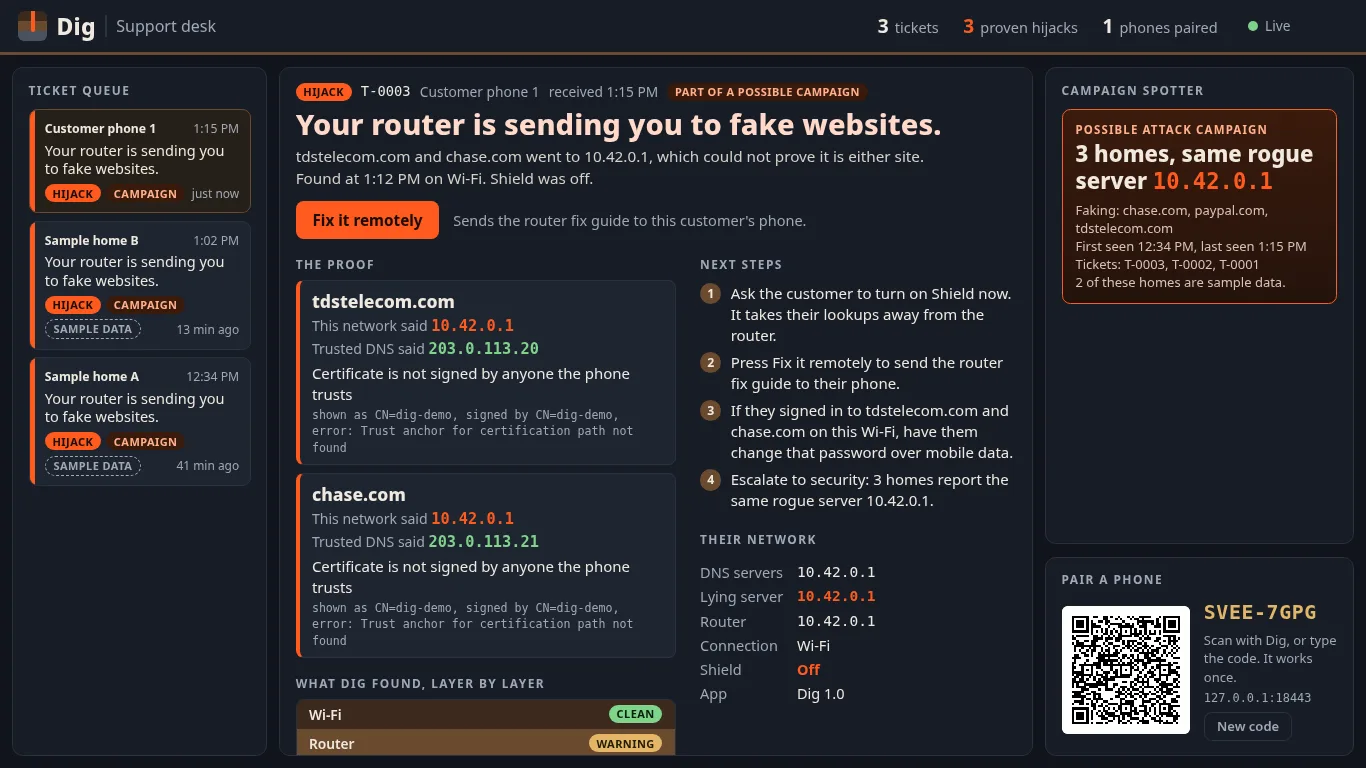
The support desk groups tickets that name the same rogue DNS server. One ticket looks like one customer's router problem. Three tickets pointing at the same server look like an attack, and the desk says so.

From the ticket, the agent sends the customer the router fix guide. The tickets and campaigns export as CSV or JSON.

Three houses on the surface. A dashed line runs down from each one to the same orange dot underground, labeled 10.42.0.1, the rogue DNS server from the demo.3 homes10.42.0.1same rogue server

Sample 04 / Screens / From the build

What it looks like

The support desk web page. A ticket queue on the left, the proof for one ticket in the middle, and a possible attack campaign of three homes on the right.
Support deskThe support desk: the ticket queue, the proof, and the campaign spotter. Sample data. Open the picture to see it full size.

Sample 05 / Lab results / Measured

Measured, not claimed

Every number in this section comes from a run. Where a run has not finished, the slot says pending. I would rather show an empty slot than a number I made up.

Accuracy, from docs/ACCURACY.md

Sites checked through honest DNS
pending
Honest DNS services used
pending
False alarms on honest DNS
pending
Lies the demo router told
pending
Lies Dig caught
pending
Run on
pending

Fuzzing, from fuzz/RESULTS.md

Parts of the code under fuzz
pending
Broken inputs thrown at them
pending
Length of the last long run
pending
Bugs it found
pending
Of those, fixed
pending

Checks before judging

High findings from Android lint and semgrep
pending
Unit tests passing
pending
Phones and Android versions it has run on
pending

The fuzzer feeds Dig DNS answers, packets and certificates that are broken on purpose, and checks that it never falls over.

Sample 06 / Privacy and limits / Plain words

What Dig keeps private, and what it can't catch

Privacy

  • Everything runs on the phone. There are no accounts.
  • There is no analytics or crash reporting in it, and no third-party code that phones home.
  • Nothing is uploaded. A report leaves the phone only when you send it.
  • Dig never asks for your location. It tells networks apart by their router address and DNS servers.
  • History stays on the phone and is kept out of cloud backups.
  • To do its job Dig talks to the network's own DNS, to the encrypted DNS providers (Cloudflare, Google and Quad9), to the addresses it is checking, and to a connectivity check page. If the network's DNS server is a public address Dig does not know, it also looks up who owns it.
  • This website sets no cookies, runs no scripts, and loads nothing from anyone else.

What Dig cannot catch

  • A lie about a site it didn't check. Dig checks a list of sites plus the ones you add. A router that lies about one other name slips past.
  • A relay that passes you through to the real site. It gives a different address, but the certificate is the real one, so Dig will not call it fake.
  • A valid certificate issued to the wrong party. If a certificate authority is tricked, the fake server passes the check.
  • A phone that is already taken over. Dig trusts the phone it runs on.
  • A network that blocks all encrypted DNS. Dig gets no honest answer to compare with. It says unknown and warns you, because the block is itself a sign.
  • The other devices in the house. Shield protects the phone it runs on. Everything else stays exposed until the router is fixed.

Sample 07 / Take one home / Android

Download

Dig is free software. Read the code, build it yourself, or install the release.

Download dig.apk

Check the file before you install it. Run sha256sum dig.apk and compare the result with the SHA-256 on this page.

SHA-256 of dig.apk
pending, posted with the release build
License
GPL-3.0-or-later